StormWatch+
- 3.3
- Rating
- 10.00K
- Installs
- Free
- Price
 Analysis by App-foxy
Weather apps are easy to replace, so I judge them by a practical question: do they help me make a better decision before I leave home, drive somewhere, plan outdoor work, or prepare for a storm? StormWatch+ takes a focused approach to that everyday problem. It is a free weather app from Cirrus Weather Solutions, LLC, built around local conditions while also covering locations across the country. I found it most useful when I wanted a quick weather check with a stronger storm-awareness angle than the basic forecast widget on a phone.
The app is available for Android devices running version 7.0 or later, and its Everyone content rating makes it suitable for a broad household audience. It has passed the early-experiment stage as well, with more than ten thousand installs, although its average rating of 3.3 from roughly sixty ratings suggests that the experience is not equally convincing for every user. That number does not make me dismiss it, but it does encourage a realistic approach: StormWatch+ is worth trying if its weather-first purpose matches your routine, not because it promises to replace every other weather tool.
How I Decide Whether StormWatch+ Is the Right Weather App
I start by asking whether a weather app earns a place in my routine after the first few curious checks. With StormWatch+, that means noticing whether its local and nationwide focus helps me make decisions I would otherwise miss, rather than simply giving me another screen to consult. I also pay attention to how often I need to open it and whether those checks feel useful or repetitive.
You May Also Like

 Blood Strike: 2.5 Anniversary
Blood Strike’s Loadouts Turn Every Drop Into a Tactical Gamble
A close look at Blood Strike’s custom loadouts: how fast access to signature weapons reshapes its battle royale rhythm, rewards preparation, and narrows the gap between fights.

 Pandora - Music & Podcasts
Pandora’s Music Is Easy to Start, but Harder to Recover
Pandora’s strength is its low-effort path from a seed to a station. Its weak spot is how much confidence it asks you to place in connection, setup, and quiet recovery.

 8 Ball Pool
 Is Built on Rivalries, Rematches, and Routine
A close look at the rivalries, rematches, shared routines, and unanswered safety questions that turn a quick pool match into a persistent mobile community.

 Samsung Music
’s Quiet Strength Is Playing What You Already Own
Its reach comes less from spectacle than from dependable access to a personal library. That simplicity is both the app’s strongest retention engine and its ceiling.

 AccuWeather: Weather Radar
AccuWeather Review: A Quick, Clear Forecast for Everyday Decisions
For everyday plans, the best forecast is the one you can understand quickly. AccuWeather makes rain timing, radar, and local conditions easy to act on, with a few trade-offs.

 Hill Climb Racing
Why Hill Climb Racing Still Turns Crashes Into One More Run
A tiny car, a bumpy hill and one more upgrade: Hill Climb Racing keeps resurfacing because its simple chaos makes every near-miss feel personal.
More From Our News Desk
View All News


Start with the kind of weather information you actually use
Before installing another forecast app, I would separate three needs. The first is a simple glance: temperature, current conditions, and an idea of whether I need a coat or an umbrella. The second is planning: checking several places, looking ahead to a commute or weekend activity, and deciding whether an outdoor plan is sensible. The third is risk awareness: paying closer attention when storms could affect travel, work, school pickup, or time outside.
StormWatch+ makes the most sense for the second and third needs. Its identity is clearly tied to local weather and storm watching, while the nationwide scope is useful when I am checking a destination away from home. That combination gives it a different purpose from a minimal clock-and-temperature widget. I would not install it merely to decorate a home screen. I would install it because I want weather information to play a more active role in my decisions.
There is also a useful distinction between checking weather and monitoring weather. A quick forecast tells me what conditions are expected. A monitoring habit means I return to the app when conditions are changing, especially before a drive or outdoor task. StormWatch+ fits better into the second habit. The practical benefit is not that it eliminates uncertainty; weather changes too quickly for that. The benefit is that it encourages me to look at the situation rather than rely on a single morning forecast.
My first-use workflow
When I test a weather app, I do not judge it from one sunny afternoon. I check my home location first, then a place I may visit, and finally the app during a day when the forecast is less stable. That workflow matters here because the nationwide element is more valuable when I use it for comparison. A local-only app can be perfectly adequate if I rarely travel. StormWatch+ becomes more appealing when I regularly move between locations or need to check conditions for someone elsewhere.
I also look at how much attention the app demands. A good weather tool should let me answer a question quickly, but it should not make me feel that I have to interpret a wall of information every time I open it. My preferred routine is to check before leaving, check again if the sky changes or a trip is delayed, and then stop looking. If an app supports that rhythm, it earns a place on my phone. If it turns every forecast into a complicated research session, a simpler alternative may be better.
What the free model means in practice
StormWatch+ is free to install, which lowers the barrier to testing it alongside an existing weather app. That is important because weather preferences are personal. Some people prioritize a clean interface, others want broader coverage, and others care most about severe-weather awareness. I would use the free version long enough to test my actual routine before considering any optional spending.
There are in-app purchases ranging from $0.99 to $9.99 per item. I would treat those purchases as optional rather than part of the basic decision to install. The key question is whether the free experience already handles the checks I need. If it does, there is no reason to pay simply because extra options exist. If a paid item becomes relevant, I would first identify the exact improvement it offers and whether it changes my daily decisions rather than merely adding convenience.
Where StormWatch+ wins for me
The strongest idea is the combination of local relevance and nationwide reach. I can think locally when I am planning my morning, then switch my attention to another area without needing a completely separate weather service. That is a small advantage until it becomes part of a real routine. For example, I might check home conditions before work, then look at a destination several hours away before deciding whether to drive, postpone, or pack differently.
The storm-oriented identity also gives the app a clearer personality than a generic forecast utility. When conditions are unsettled, I am more likely to open an app that I associate with watching the weather rather than only reading a temperature. That does not mean I would treat it as an official emergency channel. For serious warnings, I would still pay attention to local authorities and emergency communications. The app can support awareness, but it should not be my only safety plan.
Another advantage is the low-risk trial. Because the app is free and rated for Everyone, I can install it on an older compatible Android phone in the household and see whether another family member finds it easier than the default weather option. The minimum operating-system requirement is Android 7.0, so it is not restricted to only the newest devices. That makes experimentation more practical for people who keep an older phone as a backup or use a budget handset.
Three useful habits that make the app more valuable
My first tip is to use it as a two-location check rather than a one-location glance. Compare home with the place you are actually going. A forecast that looks fine at breakfast may be much less reassuring at the destination, and checking both locations helps prevent the common mistake of assuming that nearby places share identical conditions.
My second tip is to check at decision points, not constantly. I would look before leaving, before starting an outdoor job, and before beginning a return trip. This creates a simple record of changing conditions without turning the phone into a distraction. It is especially useful for people who coordinate errands or family activities, because the weather check happens immediately before an action rather than hours before it.
My third tip is to use the app as a prompt for preparation, not as permission to take risks. If a storm-focused check makes me reconsider a bicycle ride, move tools indoors, or leave earlier, it has done something useful. If I keep refreshing it while ignoring visible conditions, road closures, or official alerts, I am using it badly. The best weather app is still only one part of sensible planning.
A realistic day with StormWatch+
Imagine I have an outdoor appointment in the afternoon and a drive afterward. In the morning, I check the local forecast and then inspect the destination rather than assuming the weather will be the same everywhere along the route. If conditions look uncertain, I make a practical backup plan: carry rain gear, allow extra travel time, or decide what part of the appointment can move indoors.
Before leaving, I check again. This second look is more valuable than reading the same forecast repeatedly because it is tied to a real decision. If the day remains stable, I do not need to keep opening the app. If conditions appear to be developing, I use the information as a reason to stay alert and consult appropriate official guidance. On the way home, I check the destination again before starting the return trip. That workflow uses the app as a planning tool instead of treating it as background entertainment.
Where the usual alternatives may fit better
The biggest alternative is the weather service already built into a phone. For someone who only wants a quick temperature and a basic forecast, the default option may be faster because it requires no extra setup and is already part of the daily phone routine. I would choose that route for a person who rarely travels, does not follow storms closely, and wants the smallest possible weather experience.
A dedicated severe-weather or emergency-alert service may be a better fit for someone whose main concern is official warnings. StormWatch+ can contribute to awareness, but I would not confuse a general weather app with a complete emergency communication system. If the decision involves evacuation, dangerous travel, or a serious local threat, I would look for alerts from trusted public authorities as well.
A highly detailed professional-style weather platform may suit users who enjoy comparing several forecast layers and examining conditions closely. I would choose that category for outdoor professionals, serious hobbyists, or anyone who needs specialized information for a particular activity. StormWatch+ seems more approachable for everyday checking. Its appeal is the decision it helps me make quickly, not the idea of turning every forecast into a technical analysis project.
There is also a privacy and attention trade-off that applies whenever I add another app. Even when a weather tool is useful, I have to decide whether another icon, notification stream, and account of weather information genuinely improves my routine. If my current app already handles local and travel checks well, switching may add little. StormWatch+ needs to earn its place by making storm-related or nationwide checking more convenient for me than the tools I already use.
The cost of switching is small, but the cost of confusion is real
Moving from a familiar weather app is not difficult, but it does create a short adjustment period. I have to learn where local conditions appear, how to check another location, and which information deserves attention first. During that period, I would keep my existing weather source available rather than deleting it immediately. That gives me a direct comparison on the same day and prevents a rushed decision during unsettled weather.
I would also avoid paying for an in-app purchase during the first test. The free installation is enough to judge whether the app fits my habits. After several normal checks and at least one changing-weather day, I would know whether it saves time, makes destination checks easier, or helps me prepare more thoughtfully. Only then would a purchase between the listed price range make sense, and only if the specific option solves a problem I actually have.
The current version is 8.2.2, which is a useful sign that the app has continued to receive version updates rather than remaining frozen at its original release. It first appeared on March 22, 2020. I would still judge the present experience on my own device, because an update history alone does not tell me whether the interface suits me or whether the app feels better than the alternatives I already know.
Who should try it, and who should skip it
I would recommend trying StormWatch+ if you want a free weather app with a storm-aware identity, need to check more than one location, or regularly make plans that depend on changing conditions. It is also a reasonable candidate for families sharing weather responsibilities, commuters who travel between areas, and people using an older compatible Android phone who want to test something beyond the built-in forecast.
I would skip it if all I need is a tiny glance at the temperature, if I already rely on an official alert system for serious weather decisions, or if I prefer a highly specialized forecasting platform. I would also be cautious if I dislike experimenting with a second weather app. The average rating of 3.3 indicates that it may not satisfy everyone, so I would not present it as an automatic upgrade for every phone.
My recommendation after using it as a decision tool
StormWatch+ is best treated as a practical companion for local and travel weather checks, not as the only source I would trust in an emergency. I like the way its purpose encourages me to pay attention when conditions are changing, and the nationwide coverage gives it more usefulness than a strictly local glance. The free entry point makes it easy to test without committing money first.
My recommendation is therefore conditional but positive: install it if storm awareness and multi-location planning matter to you, then compare it with your current weather app during real routines rather than judging it from a single opening. Keep official alerts in the loop for serious situations, and do not buy an optional item until you know exactly what it improves. For straightforward daily planning, it can be a worthwhile addition; for minimalist users or specialist forecasters, another category will probably fit better.
In my experience, that is the fairest way to view StormWatch+. It does not need to replace every weather service to be useful. It only needs to make the moments before a trip, an outdoor task, or a storm-sensitive decision clearer and more deliberate. If those are the moments when your current app leaves you wanting more, this free weather app is worth a careful trial.
FAQs for StormWatch+
01What is StormWatch+ and what does it offer?
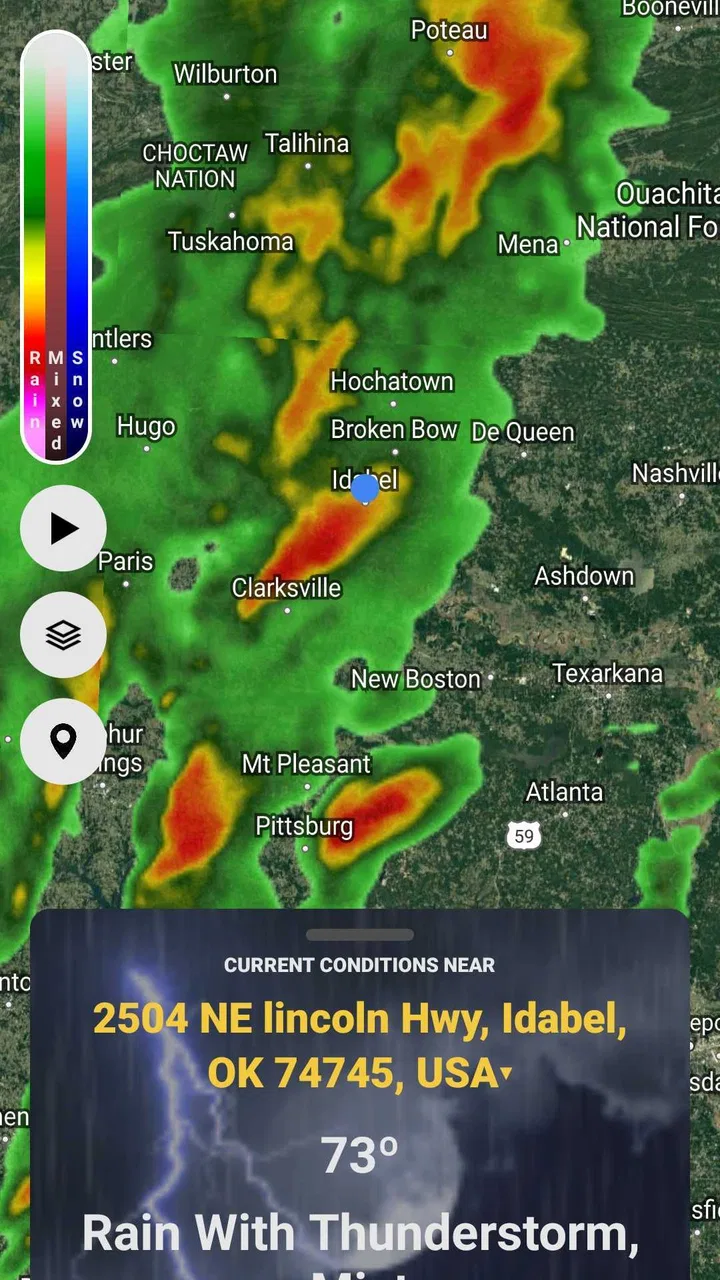
StormWatch+ is a weather application focused on severe-weather awareness and storm monitoring. It can help users follow developing storms, view weather conditions, check radar or forecast information, and receive alerts when hazardous weather may affect their area. The exact features and coverage can vary by location, device, and subscription plan, so users should review the app’s current listing before downloading.
02Does StormWatch+ provide real-time storm alerts?
StormWatch+ is designed to help users stay informed about changing weather and potentially dangerous storms, but alert timing and availability may depend on your location, notification permissions, internet connection, and the data sources used by the app. It should be treated as an additional information tool rather than a replacement for official emergency warnings from local authorities or national weather services.
03Is StormWatch+ free to download and use?
StormWatch+ may be available to download at no initial cost, although some functions can require a subscription, one-time purchase, or in-app payment. Premium features may include expanded forecasts, additional radar tools, fewer advertisements, or more detailed alerts. Before confirming a purchase, check the app store page for current pricing, trial conditions, renewal terms, and cancellation instructions.
04Does StormWatch+ require location access?
Location permission can improve StormWatch+ by allowing it to display weather conditions, warnings, and storm information relevant to your current area. However, the app may offer manual location searches if you prefer not to share precise location data. Review the permission request carefully, choose the least intrusive option that meets your needs, and remember that restricting location access may reduce the accuracy or usefulness of automatic alerts.
05Can StormWatch+ be relied on during severe weather emergencies?
StormWatch+ can be useful for monitoring storm development and receiving convenient weather information, but no mobile app should be your only source during an emergency. Alerts may be delayed by connectivity problems, device settings, battery-saving restrictions, or incomplete coverage. Keep official emergency notifications enabled, follow instructions from local authorities, and use a weather radio or other backup source when severe conditions threaten.
Pros
- Clear storm alerts help users prepare before severe weather arrives.
- Interactive radar makes it easy to track approaching storms visually.
- Location-based notifications keep forecasts relevant to your current area.
- Useful weather data is presented in a focused
- easy-to-check format.
- Helpful for monitoring changing conditions during outdoor activities.
Cons
- Some advanced features may require a subscription or in-app purchase.
- Alert accuracy can vary depending on local radar and weather data coverage.
- Frequent notifications may become distracting during active weather systems.
- The app may use extra battery when location and alerts stay enabled.
- Radar and forecast information depend on a reliable internet connection.

StormWatch+
Gallery